> For the complete documentation index, see [llms.txt](https://docs.mashmatrix.com/mashmatrix-sheet/llms.txt). Markdown versions of documentation pages are available by appending `.md` to page URLs; this page is available as [Markdown](https://docs.mashmatrix.com/mashmatrix-sheet/ai_utilization/agent_extension_agentforce.md).
# AI Agent Extension (Agentforce Integration)
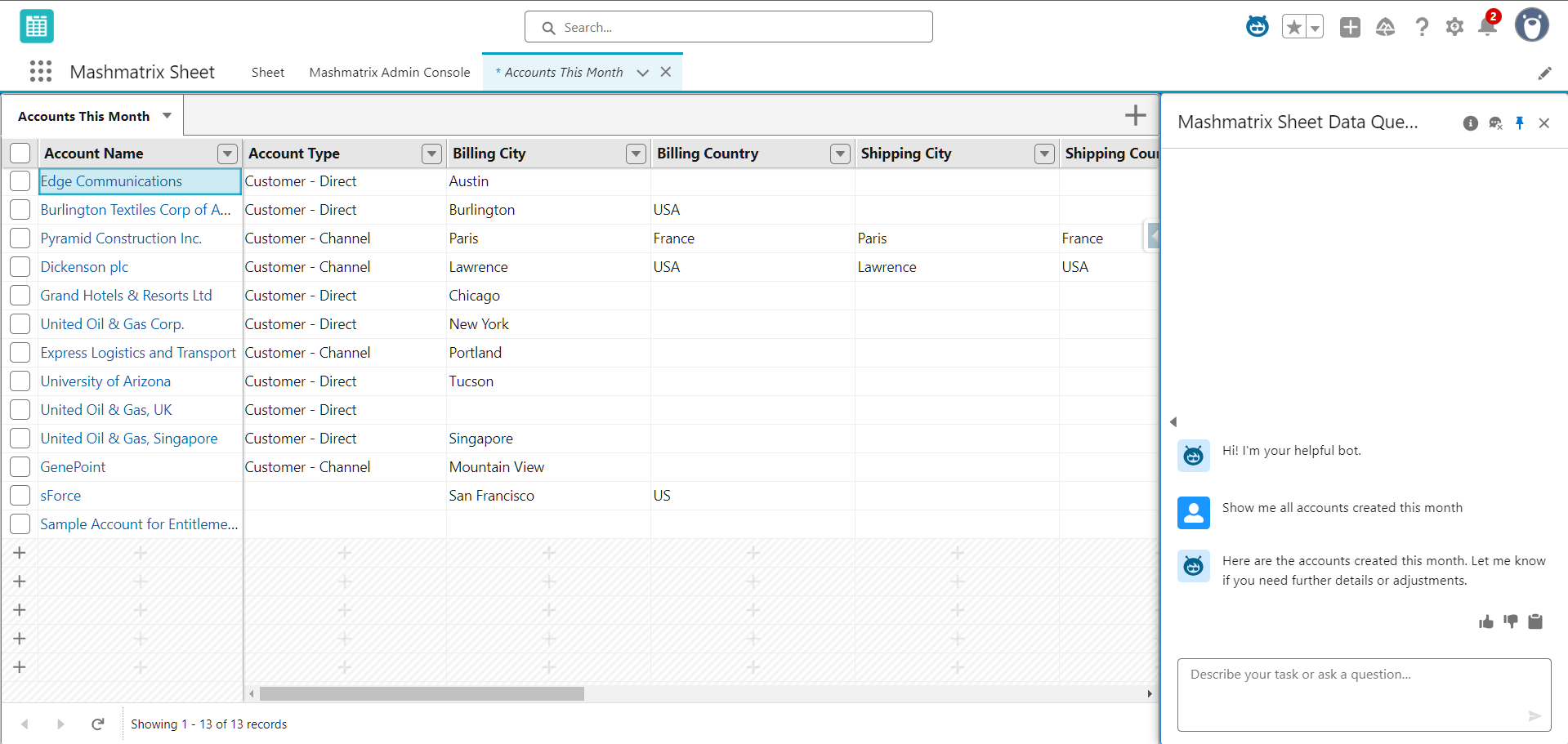
With the AI Agent Extension, you can simply give instructions to an Agentforce agent on Salesforce in natural language, and records matching the specified conditions will be automatically extracted and displayed in a list on the Mashmatrix Sheet screen.
Users can check and edit the data they need in an Excel-like interface just by describing "what data they want to see" in natural language, without having to design reports or views in advance.
This feature is provided as an extension package for Mashmatrix Sheet and requires a Salesforce organization where Agentforce is available, along with the installation and setup of the extension package.
### Major Use Cases
With the AI Agent Extension, you can display records matching conditions in Mashmatrix Sheet by giving instructions like the following to the Agentforce agent:
* Example 1:\
"**List the opportunities that closed this quarter but haven't been billed yet**"
* Example 2:\
"**I want to know the projected revenue for this month, so aggregate the amounts by sales rep and list them**"
Using the AI Agent Extension provides the following benefits:
* You can extract data just by giving instructions in natural language, even if you don't know how to create reports or dashboards.
* While viewing the extracted results on screen, you can give additional instructions like "narrow it down a bit differently" or "aggregate it from a different perspective."
* The extracted records can be edited and updated just like in regular Mashmatrix Sheet, allowing you to make data corrections and reflect the latest status directly.
### Prerequisites for Use
To use the AI Agent Extension, the following conditions must be met:
1. **Mashmatrix Sheet Installation**
* The Salesforce organization must have Mashmatrix Sheet license and package installed.
2. **AI Agent Extension Package Installation**
* The AI Agent Extension is provided as a separate extension package from the main Mashmatrix Sheet package.
* You need to install the extension package from AppExchange in advance.
* For installation methods and how to obtain the package, please refer to the following setup guide:
* [AI Agent Extension Setup Guide](https://mashmatrix.notion.site/mashmatrix-sheet-agent-extension-setup-guide-en)
3. **Salesforce Organization/Contract with Agentforce Available**
* Agentforce must be available in the Salesforce organization you are using.
* Please refer to Salesforce's latest documentation for Agentforce availability conditions, supported editions, and required additional licenses.
4. **Agentforce and Extension Setup Completed**
* Agentforce must be enabled and basic setup (such as agent creation) completed in the target organization.
* For specific setup procedures for the Mashmatrix Sheet AI Agent Extension (how to incorporate into agents, permission settings, etc.), please refer to the following setup guide:
* [AI Agent Extension Setup Guide](https://mashmatrix.notion.site/mashmatrix-sheet-agent-extension-setup-guide-en)
5. **Flex Credits Prepared**
* Using the AI Agent feature consumes Flex Credits, which are the usage units for Agentforce.
* The actual amount of credits consumed and the billing structure follow Salesforce's latest pricing information.
### Basic Usage
#### 1. Give Instructions to the Agentforce Agent
1. Open the Agentforce agent screen (chat screen) on Salesforce.
2. Enter in the message input field what information you want to retrieve in natural language.
* Examples:
* "List the opportunities that closed this quarter but haven't been billed yet"
* "Summarize this month's sales forecast by sales rep"
3. When you send the message, the Agentforce agent interprets the content of the instruction and executes the processing to retrieve the necessary data.
When the AI Agent Extension is enabled, the extracted data is displayed as a Mashmatrix Sheet screen.
#### 2. Check Results on Mashmatrix Sheet
When processing by the Agentforce agent is complete, records matching the conditions are displayed in a list on the Mashmatrix Sheet screen.
* The displayed screen allows you to check data with the same Excel-like operability as regular Mashmatrix Sheet.
* Various features provided by Mashmatrix Sheet, such as column reordering, sorting, filtering, summary rows, and formula columns, can be used directly on the extracted results.
#### 3. Give Additional Instructions or Edit While Viewing the Screen
While viewing the extracted sheet, you can give additional instructions to the Agentforce agent.
* Examples:
* "From this list, narrow it down to only the opportunities handled by Rep A"
* "Show only those with billing dates within this month"
* "Aggregate amounts by phase"
Also, the extracted records can be edited and updated just like in regular Mashmatrix Sheet.
* By directly changing values in each row and saving, the changes are reflected in the records on Salesforce.
* You can also bulk edit multiple records as needed, or perform analysis linked with other sheets using formula columns and reference values.
### Cautions and Limitations
When using the AI Agent Extension, please note the following:
* The AI Agent Extension cannot be used in organizations where Agentforce is not enabled, or without the necessary contracts/licenses.
* This feature is not available when only the main Mashmatrix Sheet package is installed. Be sure to additionally install the AI Agent Extension package from AppExchange.
* Flex Credits are consumed according to the actions executed by the Agentforce agent. Please work with your Salesforce administrator to manage credit balances and costs based on usage frequency.
* The records that can be extracted and the fields that can be edited follow the Salesforce permissions (object permissions, field-level security, sharing settings, etc.) of the logged-in user, just like in regular Mashmatrix Sheet.
* Books created by the AI Agent Extension are created in draft status, so they are subject to automatic deletion 7 days after creation. To exit draft status, you need to set a book name from the Mashmatrix Sheet application, or move the book to a folder. For details about books in draft status, see "[Create a New Book](/mashmatrix-sheet/functions_about_books_sheets/create_a_new_book.md)".
* Agentforce and Flex Credits specifications and pricing structures are subject to change by Salesforce. Please check Salesforce's and Mashmatrix's release notes for the latest information.